Getting Started in Make Your Phone Case
A clear first-session walkthrough so you open the shop, finish early orders, and know what to learn next.
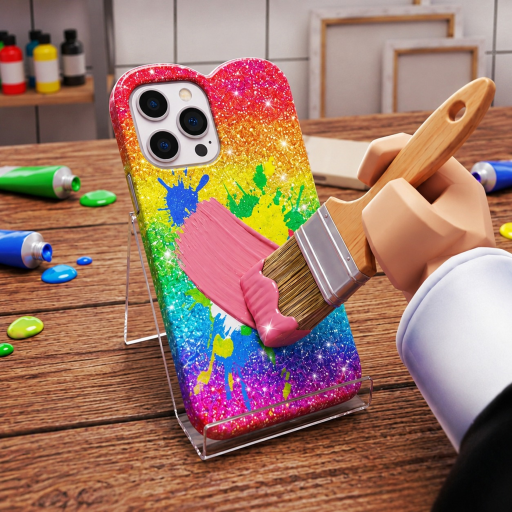
Make Your Phone Case drops you into a colorful craft shop where creativity pays the bills. Created by Crafty Creations!, the experience asks you to design phone cases, sell them to picky customers, auction standouts online, grow fame on Caseagram, and hire workers until a tiny stall becomes an empire. This beginner guide covers your first session on Roblox—what to click, what to ignore, and which wiki pages to open next.
The game released on 3 October 2026 and remains free-to-play with servers capped at six players. Platforms include PC, Mac, iOS, Android, Xbox, and PlayStation through Roblox.
Minute 0–10: land, look, learn
- Launch from the official game page and wait for assets to load.
- Complete every tutorial prompt. Skipping early tips often hides the Codes UI, worker panel, or Caseagram entry until later.
- Find your shop floor, design station, and customer queue. Mentally map where you craft versus where you sell.
- Note your cash counter. Early coins matter more than cosmetics—spend on tools that improve case quality or speed.
If the HUD feels crowded, pause and identify only three things: design bench, register/shop, and menu. Everything else can wait.
Your first designs
Start with simple, clean cases. Customers in creative sims often reward readable themes over chaotic sticker spam. Pick one color story (pastel pink, neon street, minimal black) and finish three cases in that lane before mixing styles. That practice builds muscle memory for the fuller workflow in How to Design Cases.
Aim for:
- Clear focal point (heart, logo shape, pattern block)
- Contrast between base color and stickers
- No critical art sitting under camera cutouts if the editor shows them
Save a “safe seller” template you can reproduce quickly when the queue piles up.
First sales and why speed matters
When customers arrive, match their request tags as closely as you can. A nearly perfect case that sells now beats a masterpiece that keeps the line waiting. Early reputation and cash unlock better materials, which unlock better tips—so velocity compounds.
After a handful of counter sales, read Sell and Auction to learn when a case belongs on the shop shelf versus the online auction block. Beginners should prioritize shop flow first; auctions shine once you can spare a premium piece.
Soft marketing: Caseagram awareness
Even on day one, open Caseagram when the tutorial allows. Post one of your cleanest early cases with a simple caption vibe. You will not go mega-viral immediately, but learning the post flow early makes later growth natural. Full tactics live in the Caseagram Guide.
Workers: unlock, then assign
Do not rush maximum staff before you understand design quality. Hire the first worker when the game makes the option obvious and cash is stable. Put them on repetitive tasks so you can keep creating. Details and role priorities are in Hire Workers.
First-session checklist
Use this list before you log off:
- Tutorial completed
- At least five customer sales finished
- One Caseagram post live
- One shop upgrade or material unlock purchased (if available)
- Codes UI located for later (see How to Redeem Codes)
- Bookmarked Make Money Fast for session two
What not to stress about yet
- Perfect aesthetic portfolios
- Maxing every cosmetic decoration
- Chasing unverified codes rumors
- Comparing your shop to veterans with weeks of progress
The meta will shift after patches—check the Updates Hub after the 14 November 2026 style updates and future drops. Ranked priorities live on the Tier List Hub and Best Strategies once you understand the buttons.
Controls and comfort tips
On PC, use mouse precision for sticker placement. On mobile, zoom the design canvas when possible and take an extra second before confirming a sale. Console players should bind frequently used menu actions if Roblox settings allow. Regardless of platform, keep sessions focused: one upgrade goal plus one skill goal (for example, “buy better glitter” + “match three customer color requests”).
Community and official links
Join the Crafty Creations! group for shouts and social proof, and keep the Players Hub plus Links Hub handy. Fan wikis help, but group shouts and in-game notes remain the source of truth for events.
Session two preview
Next time you play, run a tighter loop from Make Money Fast: craft two trend cases, sell the queue, list one auction piece, post to Caseagram, then reinvest. That rhythm turns the beginner sandbox into a real phone case business.
You now know enough to open the doors. Design something you like, sell it with confidence, and grow from there.
Frequently Asked Questions
Quick answers to the most common questions.
Is Make Your Phone Case free to play?
Yes. It is free-to-play on Roblox. Optional purchases may appear in the Roblox store, but the core design-and-sell loop works without spending Robux.
What should I do in my first 30 minutes?
Finish the tutorial, sell several simple cases, locate Caseagram and the Codes UI, and buy one upgrade that improves crafting or shop speed.
Should I auction before I learn the shop?
Learn shop sales first so cash is steady. Auction one premium case once you can spare inventory without emptying the counter.
Where do I go after this guide?
Read How to Design Cases next, then Sell and Auction. Use Make Money Fast when you want a repeatable earning route.
Who made the game?
Crafty Creations! (group 821391294), with ownership tied to MadeByRich/Rich. Join the group for official shouts.